

 Import Google Sheet
 Preferences
Application color scheme:
Stuck between yes and no? You are not alone. Every single day, millions of people face small decisions that feel surprisingly hard to make — and that is exactly why the spin the wheel yes or no tool exists. In just one click, a colorful spinning wheel gives you a clear, random, and completely fair answer. No coin needed. No arguing. Just spin and go.
Table of Contents
What Is Spin the Wheel Yes or No?
A spin the wheel yes or no tool is a free online random decision maker. It works exactly like it sounds: a digital wheel divided into two sections — Yes and No — spins around and lands on one of them at random. Whatever it lands on is your answer.
Think of it as a modern, digital version of flipping a coin, but with more personality. Instead of a plain heads-or-tails result, you get a fun, animated spinning experience that makes even a tiny decision feel exciting.
You can use it anywhere — on your phone, tablet, or computer — without downloading anything or creating an account. Just open the page, hit spin, and you are done.
Tools like Wheel of Names take this concept even further. They let you build a fully custom yes/no wheel with your own sounds, colors, animations, and even your own images — all completely free.
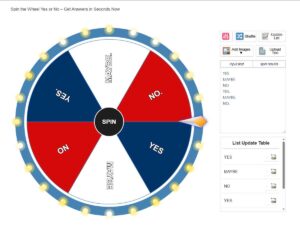
Using a yes or no spinner is about as simple as it gets. Here is exactly how it works:
How to Use the Yes or No Wheel (Step-by-Step)
Step 1 — Open the tool Go to a free online spinner like wheelofnames.name on any device. No login required.
Step 2 — Set up your entries In the text input box, type “Yes” on one line and “No” on the next. You can also add “Maybe” for a third option if you want. The tool supports text in any language and even emojis.
Step 3 — Click “Update List” This button instantly applies your entries to the wheel’s spinning slices. You will see the wheel update right away with your Yes and No sections.
Step 4 — Customize (optional but fun) Before you spin, you can pick a background music track (from nearly 100 options), choose a color theme (from over 180 themes), add a custom sound for when the winner is announced, or even upload your own background image.
Step 5 — Hit Spin Click the big Spin button. The wheel spins with a realistic animation and then slows to a stop. Your result — Yes or No — is shown in a pop-up instantly.
Step 6 — Check your spin history Click the Spin Results button anytime to review every result from your previous spins in that session.
That is it. Start to finish, the whole process takes about 15 seconds.
Why People Use a Yes or No Wheel
A yes or no decision wheel is not just a toy. There are real, practical reasons why people reach for it every day:
It removes overthinking. Research in behavioral psychology consistently shows that humans are prone to decision fatigue — the more choices we weigh, the harder any single decision becomes. A random spinner breaks the loop by taking the choice out of your hands entirely.
It is completely fair. Unlike flipping a coin (which can be influenced by how you flip it), tools like Wheel of Names use a cryptographic-quality random number generator powered by hardware noise from your device. That means every spin is 100% unbiased and truly unpredictable — not just a pseudo-random guess.
It is instant. No setup. No download. No account. Open the page and spin. The whole experience is designed for speed.
It works for groups. When two or more people can not agree on something, the wheel gives everyone a neutral, third-party answer they can all accept. It takes the personal politics out of group decisions.
It is actually fun. The spinning animation, the sound effects, and the winner pop-up make even a boring daily decision feel like a mini game show moment.
The Best Times to Use a Yes or No Spinner
You might be surprised at how many everyday situations fit perfectly:
Personal decisions
- Should I take that nap?
- Order food in or cook at home?
- Call them back or text?
- Start that project today or tomorrow?
Group decisions
- Should the team go to lunch now or in an hour?
- Do we take this new project on?
- Go with option A or option B in a meeting?
Classroom use
- Teachers can use it to decide which student answers next (in a yes/no participation format)
- Should the class watch a video or do a worksheet?
Games and social settings
- Truth or dare: answer yes or no?
- Party game tie-breakers
- Should we play another round?
Business and work
- Quick team vote on a minor task assignment
- Decide between two scheduling options
- Settle a friendly work debate
Key Features of the Wheel of Names Yes or No Spinner
The Wheel of Names tool packs an impressive number of features into a completely free package. Here is what makes it stand out from a basic coin flip app:
Truly Random Results You Can Trust
The tool uses a cryptographic random number generator — not the basic Math.random() function most apps rely on. It pulls from hardware noise in your device, making the outcome genuinely unpredictable every single time. Your result is decided the moment you hit spin, not based on where the wheel visually lands. The animation is just for the fun of it.
Nearly 100 Background Music Tracks
While the wheel is spinning, you can play background music from a library of close to 100 high-quality tracks across genres — ballroom, lo-fi, hip hop, pop, rock, disco, folk, summer holiday vibes, and more. You can even mute it completely if you prefer silence.
Over 180 Color Themes
Pick from more than 180 unique color themes to style the wheel. Or go deeper and customize each individual slice with its own color. There is also a Lights On / Lights Off toggle to add dynamic lighting effects.
Custom Winner Sounds and Animations
When the wheel lands on Yes or No, you can have it play a custom celebration sound — choices include applause, a bell, a drum roll, epic openers, and more. You can also trigger animated effects like fireworks, happy emoticons, or a victory cup animation.
Spin Duration Control
Want to build suspense? You can set the spin time to 10, 20, or 30 seconds instead of the default. Longer spins are great for group settings where everyone wants to watch.
Custom Winner Pop-Up Message
You can write your own title and message for the winner pop-up. So instead of just seeing “Yes,” you can have it say something like “Go for it!” or “The answer is YES — no backing out now!”
Upload Your Own Images
Add a personal photo as the wheel background, place a logo or image in the center of the wheel, or even use images as the actual slice entries. Batch image uploading is supported, and accepted formats include .jpg, .jpeg, .png, .gif, and .webp.
Import from Google Sheets
If you have a big list — even for a more complex wheel setup — you can import data directly from a public Google Sheet. This saves a ton of time compared to typing entries manually.
Save and Load Wheel Configurations
Save your entire wheel setup to a .wheel file on your device. Load it back later in one click. This is perfect if you use the same Yes/No setup repeatedly and want to keep your custom colors, sounds, and settings intact.
Install as a Home Screen App (PWA)
No app store needed. You can install the Wheel of Names as a Progressive Web App (PWA) straight to your phone or desktop home screen. One tap and it opens instantly, just like a native app.
Full Accessibility Support (ARIA)
More than 90% of the tool’s buttons and features are ARIA-compatible for screen reader users. This makes the spinner accessible to people with visual impairments — an often-overlooked feature that sets this tool apart.
Near-100 Custom Pointers
Choose your own winner arrow from a collection of close to 100 custom pointers to give your wheel a unique personality.
Dark Mode and Light Mode
Switch between light, dark, or system-matched themes under the Preferences menu — easy on the eyes in any setting.
Yes or No Wheel vs. Other Decision Methods
| Method | Random? | Free? | Fun? | Customizable? | Works for Groups? |
|---|---|---|---|---|---|
| Spin the wheel yes or no | ✅ Yes | ✅ Yes | ✅ High | ✅ High | ✅ Yes |
| Flip a coin | ✅ Yes | ✅ Yes | 🔸 Low | ❌ No | 🔸 Somewhat |
| Ask a friend | ❌ No | ✅ Yes | 🔸 Varies | ❌ No | ✅ Yes |
| Random number generator | ✅ Yes | ✅ Yes | ❌ Low | ❌ No | 🔸 Somewhat |
| Magic 8-Ball (toy) | ✅ Yes | ❌ Costs money | ✅ Yes | ❌ No | ✅ Yes |
| Just guessing | ❌ No | ✅ Yes | ❌ Low | ❌ No | ❌ No |
The yes or no wheel wins on almost every front — especially when you factor in the customization options and the group-friendly format.
Advanced: Customize Your Yes or No Wheel Like a Pro
The basic setup — just “Yes” and “No” on the wheel — works great. But you can make it even more tailored to your situation:
Add a third option. Type “Yes,” “No,” and “Maybe” as your three entries. Now you have a more realistic range for uncertain situations.
Weight the entries differently. In the Advanced Menu, you can adjust the weight (size) of each entry. Want “Yes” to have a 70% chance and “No” only 30%? Done. Just adjust the weight sliders accordingly.
Make Yes twice as likely. Duplicate the “Yes” entry in the Advanced settings. Now there are two Yes slices and one No slice, which gives Yes a two-thirds probability.
Add personal flair. Rename the pop-up title for each answer. Make “Yes” show “Do it! 🎉” and “No” show “Not today 🚫.”
Set a custom spin duration. Use a 20-second spin for big decisions to let the anticipation build. Use the default for quick calls.
Pick a dramatic theme. Apply one of the cinematic or dark color themes for serious decisions, or a bright fun palette for party use.
Who Is Behind Wheel of Names?
The Wheel of Names at wheelofnames.name was built by Felix Wright, an independent creator focused on building simple, useful, and fun random selection tools. The basic version is completely free and available worldwide, with no subscription or sign-up required.
The tool runs in your browser on Chrome, Edge, Safari, and other modern browsers. It works equally well on mobile, tablet, and desktop, and the interface supports all major languages for international users.
Privacy is taken seriously: the tool complies with GDPR, CCPA, and COPPA regulations, and all data is handled with a strict privacy policy. Your spin results are never stored on any external server.
Data and Statistics: Why Random Decision Tools Are So Popular
- Studies in consumer psychology show that having too many choices — even binary ones — can lead to longer decision times and lower satisfaction with the final outcome (a concept known as the paradox of choice).
- Web analytics consistently show that random wheel spinner tools see heavy traffic from students, teachers, and event organizers — particularly during back-to-school seasons and holiday party planning periods.
- The global market for online productivity and decision-making tools has grown significantly year over year as more people work and socialize online, creating demand for quick, shareable, browser-based utilities.
- A yes/no spinner reduces the cognitive load of a simple binary decision to essentially zero — you ask the question, hit spin, and move on. This makes it one of the most efficient decision-support tools available.
FAQs
What exactly is a spin the wheel yes or no tool?
It is a free online random spinner with just two options on the wheel — Yes and No. You spin it, and it lands on one at random. It gives you a neutral, instant answer to any yes-or-no question without you having to think it through.
Is the result actually random, or does the wheel land where it “looks” like it will?
The result is genuinely random. Tools like Wheel of Names use a cryptographic random number generator that determines the outcome at the moment you click Spin — before the animation even starts. The spinning visual is just for entertainment. The math behind it is fully fair and unbiased.
Can I add a “Maybe” option to the wheel?
Absolutely. Just add “Maybe” as a third entry in the text input box, click Update List, and the wheel will now have three slices — Yes, No, and Maybe. You can add as many options as you like.
Can I make Yes more likely to come up than No?
Yes. In the Advanced Entry Settings, you can adjust the weight of each entry. Give “Yes” a higher weight than “No,” and the Yes slice will be physically larger on the wheel, increasing its probability of being chosen. You can set any ratio you want.
Is this tool free to use?
Yes, the full basic version is 100% free. No account, no subscription, no download. Open the page in any browser and you are ready to spin immediately.
Can I use it on my phone?
Yes. The tool is fully optimized for mobile browsers, with touch support and a responsive layout. You can also save it to your home screen as an app (PWA) for one-tap access anytime.
Does it remember my past spins?
During your current session, yes. The Spin Results button shows a full history of everything the wheel has landed on. However, when you close the browser tab, that session history is cleared. To save your wheel setup permanently, use the “Save Wheel to File” feature and reload it next time.
Can I share a custom yes/no wheel with someone else?
Yes. You can share your wheel via social media platforms including Facebook, Twitter, and Pinterest directly from the tool. You can also save your wheel configuration to a file and send it to someone else, who can then load it on their own device.
Is the tool accessible for people with visual impairments?
Yes. Over 90% of the tool’s buttons and features are ARIA-compatible, meaning screen readers can navigate and use the tool effectively. This is a rare and important accessibility feature for a free online spinner.
What if I want a more complex wheel with more than just Yes and No?
The tool supports up to hundreds of entries. You can build wheels with names, words, numbers, tasks, or images — not just yes and no. Think of the yes/no wheel as the simplest version of a much more powerful random picker.
How is this different from just flipping a coin?
Flipping a coin is random but offers no customization, no group visibility, no history tracking, no fun animations, and no ability to add third or fourth options. A yes/no wheel is more flexible, more visual, more engaging, and honestly just more fun — especially in a group setting where everyone can see the result at the same time.
Can I set a longer spin time to build suspense?
Yes. In the Customize menu under the During Spin tab, you can set the spin duration to 10, 20, or 30 seconds. Perfect for big-reveal moments or group settings where everyone wants to watch the wheel slow down dramatically.
Final Thoughts
The spin the wheel yes or no tool is one of those small internet tools that punches way above its weight. It is simple enough to use in five seconds, but powerful enough to handle real customization when you need it. Whether you are a teacher settling a classroom debate, a friend group trying to pick a restaurant, a team needing a quick call on a minor task, or just someone who is tired of going back and forth in their own head — the yes/no wheel gives you a clean, fast, fair answer every time.
The best part? It is completely free, works on every device, and does not require you to sign up for anything. Just open the page, spin, and move on with your day.