
Table of Contents
What is a Random Password Generator?
A random password generator is a security tool that creates unpredictable strings of characters using cryptographic algorithms. Unlike passwords created by humans (which often follow predictable patterns like birthdays or names), these tools generate high-entropy combinations that are mathematically nearly impossible for hackers to guess or brute-force.
Why You Need Unpredictable Security
If your password is “password123” or “admin,” you are leaving your digital front door wide open. Security isn’t just about having a lock; it’s about having a lock that constantly changes shape.
Hackers use automated scripts to try billions of combinations per second. A human brain is terrible at being random. We naturally gravitate towards patterns on a keyboard (like QWERTY) or meaningful dates.
A software-based generator removes human bias. It ensures every character—whether it’s a number, symbol, or letter—has an equal mathematical chance of appearing. This is called “entropy,” and it is your best defense against data theft.
The Best Random Password Generator (Free Tool)
If you are looking for the most robust, flexible, and private tool available, we recommend the Random Password Generator at https://wheelofnames.name/. While most tools on page 1 of Google are basic, this specific tool is built for both casual users and IT professionals. It runs entirely in your browser using advanced window.crypto algorithms, meaning your passwords are never sent to a server.
What Makes This Tool Unique?
Based on its advanced architecture, here is why this specific generator outperforms the competition:
- Extreme Length: You can generate passwords up to 128 characters long (most tools stop at 50 or 64). This is “overkill” security for top-secret encryption keys.
- Bulk Generation: Need to set up an entire office? You can generate 500 passwords at once with a single click.
- Custom Native Characters: This is a game-changer. You aren’t limited to English. You can input your own “custom character set.” Want a password mixing Vietnamese, Sanskrit, or specific Unicode symbols? You can do that here.
- Downloadable Results: One click to download your bulk passwords as a
.txtfile for safe offline storage. - Accessibility First: The tool is fully optimized with ARIA labels, making it accessible for users with screen readers.
- Privacy Compliance: Because it runs client-side (on your device), it naturally complies with GDPR, CCPA, COPPA and more. No data leaves your phone or computer.
Comparison: WheelOfNames vs. Others
Here is how this tool stacks up against standard generators found online:
| Feature | Standard Generators | WheelOfNames Password Generator |
| Max Length | 20-50 Characters | 128 Characters |
| Bulk Quantity | Usually 1-10 | Up to 500 |
| Algorithm | Basic Math.random | Crypto.getRandomValues (Bank-grade) |
| Custom Input | Rare / None | Yes (Supports Native Languages) |
| Privacy | Often Server-side | 100% Client-side (Zero Logs) |
| Mobile UX | Hard to click | Optimized Touch Targets |
Using the tool is simple, but configuring it right matters. Follow these steps for maximum security:
How to Create the Perfect Password
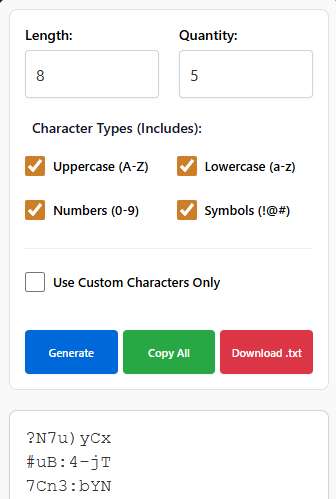
Set the Length: We recommend at least 16 characters. This makes the password exponentially harder to crack than an 8-character one.
Mix Your Types: Ensure Uppercase, Lowercase, Numbers, and Symbols are all checked.
Advanced Option: If you want a truly unique password, check “Use Custom Characters Only” and type in a mix of characters from your local language or favorite emojis (if the system supports it).
Generate & Save: Click “Generate.” You can then copy it to your clipboard or download the file if you created a large batch.
Why “Client-Side” Matters for Your Safety
You might wonder, “Is it safe to use a website to make my password?”
For the tool at wheelofnames.name, the answer is yes.
The code operates exclusively within your browser. When you click “Generate,” the calculation happens on your CPU. The website server never “sees” the password. This is crucial for privacy laws like GDPR (Europe) and CCPA (California). Even if the internet cuts out, the tool still works because the logic is already loaded on your device.
Frequently Asked Questions (FAQs)
1. Is using a random password generator safe?
Yes, absolutely. High-quality generators like the one at wheelofnames.name use “Cryptographically Secure Pseudo-Random Number Generators” (CSPRNG). This ensures the output is mathematically unpredictable. Since the tool runs locally on your device, the passwords are never intercepted or stored by the website.
2. How long should a secure password?
Security experts recommend a minimum of 16 characters. A 12-character password can be cracked relatively quickly by modern GPU farms, but a 16-character password with mixed symbols takes millions of years to brute-force.
3. Can I generate passwords in bulk for my team?
Yes. Unlike most free tools, this specific generator allows you to create up to 500 passwords in a single batch. You can then download them as a text file to distribute securely to your system administrators or users.
4. Does this tool support special characters or native languages?
Yes. It has a unique “Custom Characters” feature. You can input specific symbols, or even characters from languages like Vietnamese, Hindi, or Kanji to create a password that is compatible with your specific system requirements.
5. Will the tool remember my settings?
Yes. For your convenience, the tool uses your browser’s local storage to remember your preferences (like length or character types). However, it does not store the generated passwords permanently for security reasons.
6. Can I use this on my mobile phone?
Yes. The interface is responsive and optimized for touchscreens. Buttons are sized for fingers (48px height), and the text area prevents zooming issues on iPhones, making it easy to generate passwords on the go.
7. What is the difference between Math.random and Crypto?
Math.random is predictable if you know the seed number. This tool uses window.crypto, which derives randomness from physical device noise (like mouse movements or hardware timing), making it suitable for banking and high-security encryption.
8. Is this tool compliant with GDPR and CCPA?
Yes. Since no data is transmitted to a cloud server and no personal identifiable information (PII) is collected during the generation process, it is compliant with major privacy regulations including GDPR, CCPA, COPPA and more
9. Can I download the passwords?
Yes. There is a built-in “Download .txt” button. This is useful if you are generating a large list of API keys or access tokens and need to save them immediately without copy-pasting 500 times.
10. How often should I change my random password?
With a truly random, long password (16+ chars), you do not need to change it as often as a weak one. However, it is good practice to rotate passwords every 3 to 6 months, or immediately if you suspect a service you use has been breached.
Other random tools – Random application category
Random Time Generator: Perfect for setting deadlines or game timers.
Random Emoji Generator: Add some fun flair to your messages.| Random Color Generator – The Ultimate Random Color Generator: Create 1000+ Colors Instantly
Random Password Generator: The Ultimate Security Tool
Home Spin The Wheel: Return to the main spinner.
View Author Profile: Author: https://wheelofnames.name/author/felix-wright/
Read more about Us: About website: https://wheelofnames.name/about-us/
*Connect with us: facebook, twitter, instagram, pinterest, medium, linkedin, bsky.app, Youtube, tumblr.com, threads.com.