
The short answer is: Yes. If you have ever found yourself cutting paper slips, folding them up, and tossing them into a hat just to pick a winner, you have probably asked yourself: “Is there an app that shuffles names?”
But the longer answer is much more exciting. Not only do these apps exist, but they have also evolved from simple list randomizers into powerful, engaging tools used by millions of teachers, event hosts, and streamers worldwide.
In this comprehensive guide, we will explore the best tools available, compare their features, and show you how to use a name shuffler like Wheel of Names to bring fairness—and fun—to your decision-making.
Table of Contents
What Exactly Is a Name Shuffling App?
A name shuffling app is a digital tool designed to randomize a list of items. While the core technology uses a random number generator (RNG) algorithm to ensure the sequence is unpredictable, the user experience varies wildly between tools.
Think of it as the modern, efficient evolution of “drawing straws.”
These apps generally fall into two categories:
- List Randomizers: These simply take a text list and reorder it instantly (e.g., 1. John, 2. Sarah, 3. Mike).
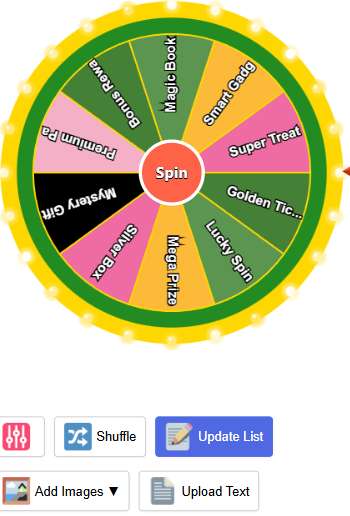
- Visual Spin Wheels: These turn the shuffling process into a game show experience, using a spinning wheel graphic to build suspense before landing on a winner.
Why Digital Shuffling beats “The Hat”
- True Randomness: Humans are bad at being random. We subconsciously pick papers from the top or fold them differently. Algorithms don’t have biases.
- Speed: You can shuffle 500 names in a millisecond. Trying to write 500 names on paper would take hours.
- Transparency: When sharing your screen during a Zoom call or livestream, a digital app proves to the audience that the result wasn’t rigged.
Video Tutorial: How to Use Wheel of Name:
Top 3 Free Name Shuffling Apps Compared
Not all shufflers are created equal. Depending on whether you need quick data or a visual spectacle, here is how the top contenders stack up.
| Feature | Wheel of Names (Recommended) | Random.org | Excel / Google Sheets |
| Best For | Engagement, Classroom, Raffles | Pure Data, Scientific use | Office work, Sorting |
| Visual Interface | ⭐⭐⭐⭐⭐ (Colorful Wheel) | ⭐ (Plain Text) | ⭐ (Spreadsheet) |
| Fun Factor | High (Sounds, Confetti) | Low | None |
| Ease of Use | Very Easy (Paste & Spin) | Medium | Hard (Requires formulas) |
| Shareability | Yes (Embed & Share Links) | No | Yes (File sharing) |
| Cost | Free | Free | Paid (Office License) |
Verdict
- For Fun & Events: Go with Wheel of Names. It is unbeatable for engagement.
- For Silent Data Sorting: Random.org is a solid utility.
- For Internal Data: Excel works if you already have the data there and know the formulas.
Spotlight: Why Wheel of Names Is the Industry Leader
When people search for an app to shuffle names, they usually want something that looks good. That is where Wheel of Names dominates. It isn’t just a tool; it’s an experience.
Key Features That Matter
- Customization: You aren’t stuck with default colors. You can match the wheel to your brand, school colors, or holiday themes.
- Multimedia Support: You can add images to the wheel segments (great for product giveaways) and sound effects like drumrolls, applause, or cheering.
- The “Remove Winner” Feature: This is critical for fairness. Once a name is picked, the app allows you to remove it from the wheel so that person cannot win twice.
- No Login Required: You don’t need to create an account to use the basic features. Just open the browser and start shuffling.
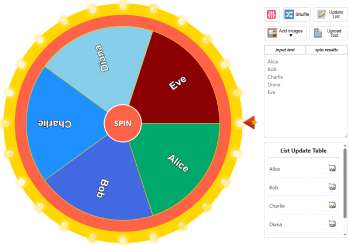
A screenshot of the Wheel of Names interface showing a colorful wheel with names populated
Step-by-Step: How to Host the Perfect Raffle
Whether you are a teacher picking a student or a streamer giving away a gift card, the process matters. Here is a professional workflow to ensure your shuffle is smooth and transparent.
Step 1: Prepare Your List
Don’t type names manually into the wheel one by one. Write them in a notepad or spreadsheet first.
Tip: Ensure there are no empty lines or duplicate names (unless you want to give someone extra chances).
Step 2: Launch the App
Go to Wheel of Names. You will see a default list. Clear it and paste your prepared list into the text box on the right.
Step 3: Customize for Impact
Add Sound: Go to settings and enable “Tick sound” for the spin and “Applause” for the result.
Set Spin Time: If you are live streaming, set the spin duration to 10-15 seconds. This builds hype. If you are in a rush, set it to 3 seconds.
Step 4: The Shuffle (The Spin)
Click the center of the wheel. Let everyone watch it slow down.
Pro Tip: Read the name out loud excitedly when the wheel stops.
Step 5: Post-Spin Management
A popup will announce the winner. You will see two buttons:
Close: Keeps the name on the wheel (they can win again).
Remove: Takes them off the wheel (fair for ensuring unique winners).
7 Creative Use Cases (Beyond Just Names)
While the keyword is “shuffles names,” these apps are semantic chameleons. You can use them for almost any decision-making paralysis.
1. The “What’s for Dinner?” Wheel
Couples often argue about where to eat. Paste a list of 10 local restaurants into the app and agree to go wherever the wheel lands. No arguments, just fate.
2. Fitness Roulette
Can’t decide on a workout? Fill the list with exercises: “20 Pushups,” “1-min Plank,” “30 Squats.” Spin the wheel 5 times to create a random high-intensity workout.
3. Ice Breakers for Meetings
Instead of names, fill the wheel with questions like:
- “What was your first job?”
- “What is your favorite movie?”
- “Show us the last photo on your phone.”Spin it at the start of a Zoom call to loosen up the team.
4. Classroom Chores
Teachers use shufflers to assign daily tasks like “Line Leader,” “Board Eraser,” or “Door Holder.” It prevents students from feeling like the teacher is playing favorites.
5. Improv Topics
For drama students or creative writers, shuffle a list of random scenarios or words to spark immediate creativity.
6. Draft Orders regarding Fantasy Sports
Setting up a Fantasy Football league? Use the shuffler to determine who gets the coveted first pick in the draft.
7. Task Delegation
In Agile or Scrum meetings, use the wheel to randomly assign minor bugs or tasks that no one is volunteering for.
Technical Corner: Is It Truly Random?
For the skeptics out there, you might wonder: Can these apps be rigged?
Reputable browser-based shufflers use Pseudo-Random Number Generators (PRNGs), typically based on standard JavaScript libraries (Math.random()).
While a computer cannot generate “true” randomness (which requires atmospheric noise or radioactive decay data), PRNGs are mathematically statistically uniform. This means that for a list of 100 names, over millions of spins, each name will be picked approximately 1% of the time.
Bottom Line: Unless you are running a million-dollar state lottery, these apps are more than secure and fair enough for any classroom, office, or contest use.
Frequently Asked Questions (FAQs)
Is there an app that shuffles names for free?
Yes! Tools like Wheel of Names are completely free to use. They are supported by non-intrusive ads, meaning you don’t have to pay a subscription fee.
Can I use name shufflers on my phone?
Absolutely. Modern shuffling tools are “responsive,” meaning they adjust to fit the screen of an iPhone, Android, or tablet perfectly. You don’t even need to install an app; just use your mobile browser.
How many names can I shuffle at once?
Most tools can handle lists of up to 500-1,000 names without lagging. For lists larger than 10,000, you might need specialized database software, but for standard uses, web apps are perfect.
Can I save my list for later?
Yes. Wheel of Names allows you to save your lists if you create a free account or link your Google Drive, so you don’t have to re-type your class roster every day.
Is it possible to rig the wheel?
On reputable sites, no. The code runs on the client-side (your browser) using standard randomization standards. The site owner cannot control who wins your raffle.
Final Thoughts
So, is there an app that shuffles names? Yes, and it is likely better than you imagined.
Gone are the days of manual sorting or drawing messy papers from a hat. With tools like Wheel of Names, you get speed, fairness, and a visual excitement that turns a boring administrative task into a highlight of your day.
Whether you are a teacher managing a lively classroom, a streamer engaging a digital audience, or just a group of friends trying to pick a movie, a name shuffler is the simple, free solution you need.
Ready to try it? Don’t just shuffle—spin to win at Wheel of Names.
Other random tools – Random application category
Random Time Generator: Perfect for setting deadlines or game timers.
Random Emoji Generator: Add some fun flair to your messages.| Random Color Generator – The Ultimate Random Color Generator: Create 1000+ Colors Instantly
Random Password Generator: The Ultimate Security Tool
Home Spin The Wheel: Return to the main spinner.
View Author Profile: Author: https://wheelofnames.name/author/felix-wright/
Read more about Us: About website: https://wheelofnames.name/about-us/
*Connect with us: facebook, twitter, instagram, pinterest, medium, linkedin, bsky.app, Youtube, tumblr.com, threads.com.