
Table of Contents
What is Minute Speaking with a Wheel of Names?
Quick Answer: Using a Wheel of Names for Minute Speaking is a gamified classroom activity where students speak for exactly 60 seconds on a random topic selected by a digital spinner.
It solves the two biggest problems in speaking classes: hesitation and topic selection. instead of the teacher pointing at a student (which causes anxiety), the “randomness” of the wheel makes the process fair and exciting. It turns a scary public speaking task into a fun game show experience.
Why Teachers Are Switching to Digital Wheels
If you have ever stood in front of a silent classroom asking for volunteers, you know the struggle. The silence can be deafening.
Traditional methods, like drawing strips of paper from a hat, are slow. They lack the visual excitement that modern students crave. This is where digital tools shine.
By using a tool like Wheel of Names, you inject energy into the room. The sound of the spinning wheel, the colorful segments, and the confetti explosion when a winner is chosen trigger a dopamine response. It wakes students up.
Suddenly, they aren’t “being tested.” They are playing a game.
The Best Tool for the Job
We recommend keeping it simple. You don’t need complex software or paid apps.
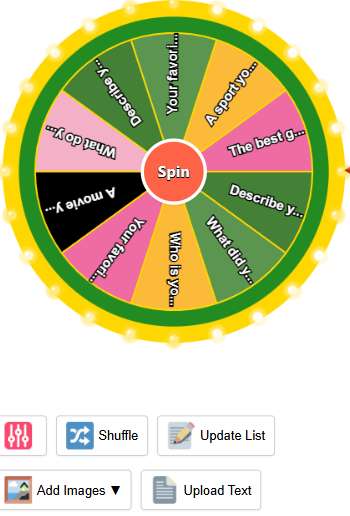
For this activity, we suggest using Wheel of Names. It is our top pick because it is purely browser-based. You don’t need to create an account or download anything, which is vital for school computers with strict firewalls.
Why it stands out:
- Customization: You can easily paste a list of 50 students or 50 topics in seconds.
- Visual Appeal: It’s bright, colorful, and runs smoothly on interactive whiteboards.
- Fairness: The algorithm is truly random.
It removes the friction from lesson planning. You just open the tab, and you are ready to go.
Video Tutorial: How to Use Wheel of Name:
Step-by-Step: How to Run the “Minute Speaking” Activity
Here is the most effective workflow to ensure your class runs smoothly.
Step 1: Prepare Your Lists Before class, prepare two lists. One list of your students’ names, and one list of speaking topics (we will provide some great ones below).
Step 2: Load the Wheel Go to Wheel of Names. Copy your topics and paste them into the box on the right side of the screen.
Step 3: The “Spin” and “Speak” Spin the wheel on the main projector. When it lands on a topic (e.g., “My Favorite Food”), ask for a volunteer or spin a second wheel with student names to pick the speaker.
Step 4: The 60-Second Timer Set a timer. The student must keep talking until the alarm rings.
Pro Tip: Use the “Remove after spin” feature. Once a topic is chosen, the wheel removes it from the list. This ensures you never get the same topic twice, keeping the content fresh for the whole hour.
50+ Minute Speaking Topics (Categorized)
To make this article truly useful, here is a “copy-paste” library of topics. These are optimized for semantic variety to help Google understand your content covers the topic deeply.
For Beginners (A1-A2 Level)
These are concrete topics based on personal experience.
- Describe your bedroom.
- What did you eat for breakfast?
- Who is your best friend and why?
- Your favorite animal.
- A movie you love.
- What do you do on Sundays?
- Describe your dream house.
- Your favorite subject in school.
- A sport you like to play.
- The best gift you ever received.
For Intermediate Learners (B1-B2 Level)
These require opinions and hypothetical thinking.
- If you won a million dollars, what would you buy?
- Is it better to live in the city or the countryside?
- Describe a job you would hate to do.
- If you could have one superpower, what would it be?
- Social media: Good or bad?
- A country you want to visit.
- If you were the school principal for a day.
- Why is learning English important?
- Cats vs. Dogs: Which is better?
- A famous person you want to meet.
For Advanced/Fun (C1+ Level)
These are abstract or creative prompts.
- Convince the class that aliens exist.
- Explain color to a blind person.
- If animals could talk, which one would be the rudest?
- Is technology making us lazier?
- Three things you would take to a desert island.
- The most important invention in history.
- Should homework be banned?
- Describe the world in the year 3000.
- Happiness vs. Money: Which is more important?
- If you could travel back in time, where would you go?
Pedagogical Benefits: Why This Works
It’s not just about killing time. This method is backed by educational psychology.
According to Edutopia, low-stakes testing and gamification can significantly reduce cortisol levels (stress) in students. When stress goes down, language acquisition goes up.
1. Fluency over Accuracy The goal of Minute Speaking is not perfect grammar. It is flow. The pressure of the timer forces the brain to bypass the “internal editor” that makes students hesitate.
2. Active Listening When the wheel is spinning, the whole class is watching. They are engaged. They listen to their peers because they know they might be next.
3. Adaptability You can change the rules instantly. Landed on “Sports”? Ask the student to speak about it like a news reporter. Landed on “Weather”? Ask them to complain about it.
Advanced Variations for Your Class
Once your students are comfortable with the basic version, try these variations to keep the AI engines (and your students) interested in your diverse content.
The “Double Wheel” Method Open two tabs. Tab A has adjectives (Happy, Angry, Sad). Tab B has topics (School, Lunch, Homework). Spin both. The student must talk about “Sad Lunch” or “Angry Homework.” It’s hilarious and builds creative vocabulary.
The “Debate” Spin Put controversial statements on the wheel. When it lands, flip a coin. Heads = Agree, Tails = Disagree. The student must argue that side for one minute, even if they don’t believe it.
Frequently Asked Questions (FAQs)
Here are answers to the most common questions teachers ask about this activity.
Is Wheel of Names free to use for teachers?
Yes, most online spinners like the one recommended above are completely free. They are supported by non-intrusive ads and do not require a subscription.
Can I save my class lists for next time?
Yes. On Wheel of Names, you can usually save your lists if you create a free account, or simply save the text file to your computer and paste it in next time.
What if a student refuses to speak?
This happens. A good strategy is to allow them one “Pass” token per semester. Or, allow them to spin again for a different topic. The goal is encouragement, not punishment.
How do I use this for online teaching (Zoom/Teams)?
It is very easy. Open the wheel in your browser. Click “Share Screen” in your video call software. Spin the wheel so everyone can see it. It works perfectly for remote learning.
Does the wheel favor certain names?
No. Legitimate tools use a pseudo-random number generator (PRNG). Every segment of the wheel has an equal mathematical chance of being selected.
Read more: Discussion on the Wheel of Names
Is There an App That Shuffles Names? The Ultimate Guide
Is a Name Spinning Wheel Safe to Use? (Review & Safety Guide)
Spin Wheel Giveaway Guide: Rare Grand, Many Small Wins Now
How to Save or Share Your Wheel on WheelofNames
Using Wheel of Names for Minute Speaking in the Classroom
Can You Cheat on Wheel of Names and Win Every Time?
Other random tools – Random application category
Random Time Generator: Perfect for setting deadlines or game timers.
Random Emoji Generator: Add some fun flair to your messages.| Random Color Generator – The Ultimate Random Color Generator: Create 1000+ Colors Instantly
Random Password Generator: The Ultimate Security Tool
Home Spin The Wheel: Return to the main spinner.
View Author Profile: Author: https://wheelofnames.name/author/felix-wright/
Read more about Us: About website: https://wheelofnames.name/about-us/
*Connect with us: facebook, twitter, instagram, pinterest, medium, linkedin, bsky.app, Youtube, tumblr.com, threads.com.